
金曜ごはん#44 「すだちを味わう鍋」


mayumi
弊社の Web サービスはすべてNapier を使って公開しています。
最近Napier-Client側に修正が入り、その影響で、利用中のNapier-Clientのnpmパッケージを更新する必要が出てきました。
久しぶりの作業で手順をだいぶ忘れており、気分的に億劫だったので、いっそこの機会に自動化しようとしたところ、昨年秋以降のセキュリティ強化の流れでnpmまわりの前提が変わっていて、想定以上に手間取ったという話です。
多くの方にとってはすでに通り過ぎた話かもしれませんが、未来の自分のために記録しておきます。
単に npm パッケージを公開するだけで複雑なロジックもないため、まずは Gemini CLI にGitHub Actionの手順のたたき台を作らせて進めました。ところがGitHub Actions上で実行すると、以下のエラーで失敗しました。
npm error code EOTP
npm error This operation requires a one-time password from your authenticator.
npm error You can provide a one-time password by passing --otp=<code> to the command you ran.
npm error If you already provided a one-time password then it is likely that you either typoed
npm error it, or it timed out. Please try again.
npm error A complete log of this run can be found in: /home/runner/.npm/_logs/2026-01-16T04_37_34_086Z-debug-0.log
Error: Process completed with exit code 1.
要するに「認証アプリのワンタイムパスワード(OTP)が必要」というエラーです。CI/CDからのpublishでOTPを都度入力する運用は現実的ではありません。
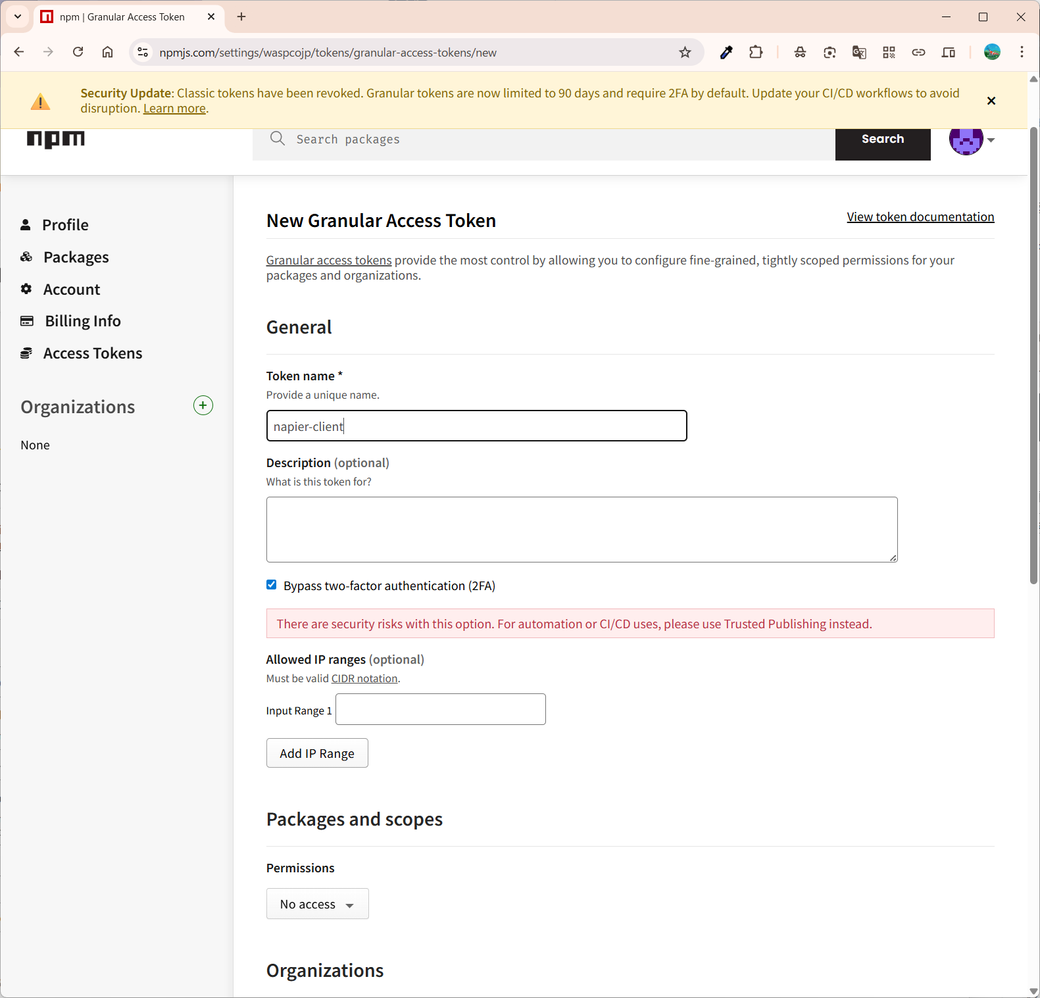
npmの画面でアクセストークンを作り直そうとすると、自動化用途ではTrusted Publishingを使うべきという警告が表示されました。加えて、Classic tokenの失効や、Granular tokenの有効期限・2FA 要件など、従来のトークン運用が難しくなったことが明示されています。
There are security risks with this option. For automation or CI/CD uses, please use Trusted Publishing instead.
Security Update: Classic tokens have been revoked.Granular tokens are now limited to 90 days and require 2FA by default. Update your CI/CD workflows to avoid disruption.
結論として、CI/CDからpublishするなら「Trusted Publishing」を使え、ということのようです。
Trusted Publishing は、OpenID Connect(OIDC)認証を利用して、CI/CDワークフローから npm パッケージを公開する仕組みです。
Trusted publishing for npm packages
OpenID Connect
npm側の警告にもある通り、2025年12月9日のアップデートで Classic tokenが使えなくなりました。今後 CI/CD ワークフローからpublishする際は、Granular tokenか、より安全な方法として OIDC(Trusted Publishing)を使うことになります。
npm classic tokens revoked, session-based auth and CLI token management now available
npmのドキュメントの手順(Trusted publishing for npm packages)どおりに設定すれば、基本的には難しい点はありません。
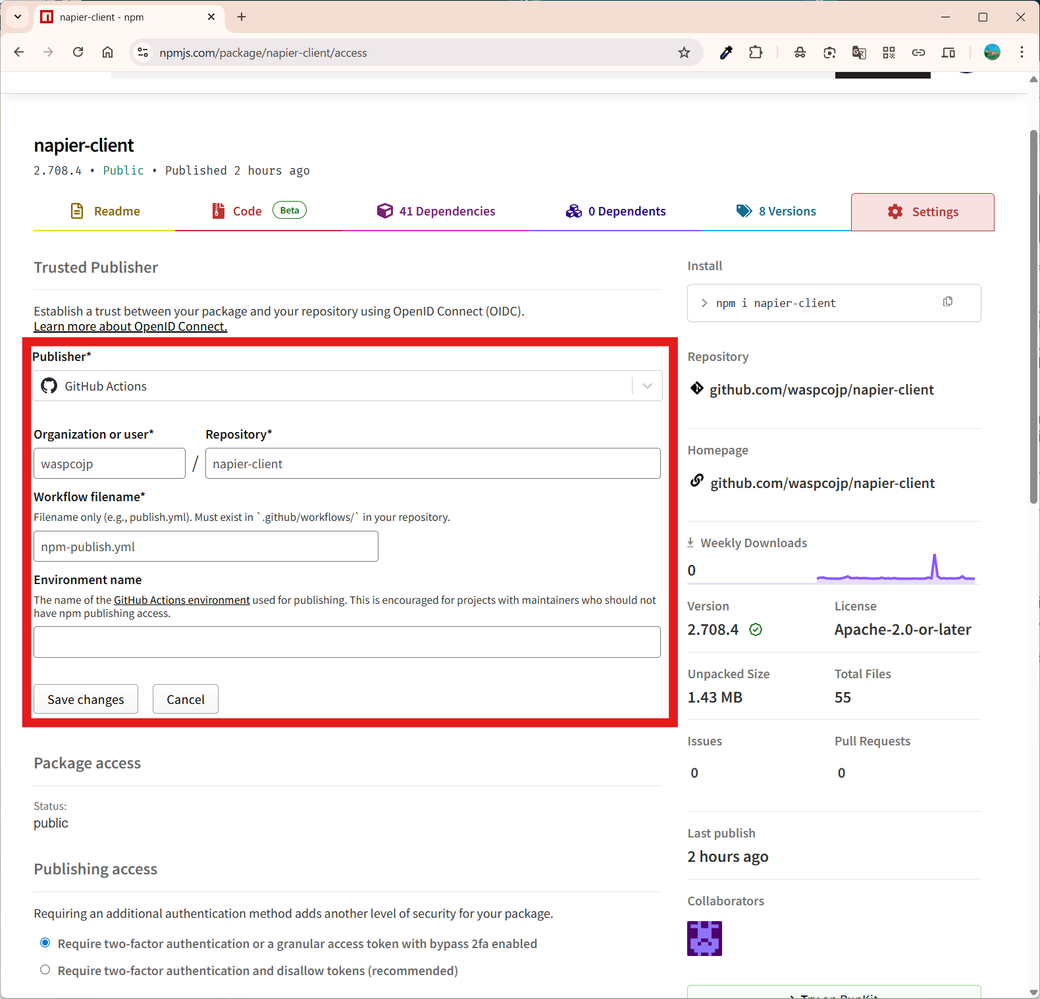
npmのパッケージ設定から、GitHubのリポジトリを関連付けます。
(例)
name: npm-publish

on:
  push:
    tags:
      - 'release-*'
permissions:
  contents: read
  id-token: write

jobs:
  publish:
    runs-on: ubuntu-latest
    steps:
      - uses: actions/checkout@v4

      - uses: actions/setup-node@v4
        with:
          node-version: '24'
          registry-url: 'https://registry.npmjs.org'

      - name: Install dependencies
        run: npm install

      - name: Publish to npm
        run: npm publish
ポイントはpermissions: id-token: writeで、これにより GitHub Actions が OIDC トークンを発行できるようになります。
このワークフローでは、条件どおり release-* のタグを打つと npm パッケージが公開されます。
これでうまくいくと思ったら、またエラーがでました。
npm error code E422

npm error 422 Unprocessable Entity - PUT https://registry.npmjs.org/napier-client - Error verifying sigstore provenance bundle: Failed to validate repository information: package.json: "repository.url" is "", expected to match "https://github.com/waspcojp/napier-client" from provenance

npm error A complete log of this run can be found in: /home/runner/.npm/_logs/2026-01-16T05_13_27_299Z-debug-0.log
OIDCによるpublishではProvenance(生成元情報)が作成され、その検証でpackage.jsonの repository情報と、実際に実行しているリポジトリ情報の整合性が厳密にチェックされるようです。今回のケースでは、package.json側のrepository.urlが空だったため、期待される URLと一致せずに弾かれていました。
そこで package.jsonにrepositoryを追加したところ、GitHub Actionsからnpmへ publish できました。
"repository": {
  "type": "git",
  "url": "git+https://github.com/waspcojp/napier-client.git"
}
当初は「AI に任せればすぐ終わる」と思っていましたが、npm側のセキュリティ強化で前提が変わっており、案外手間取りました。
とはいえ最終的には自動化でき、セキュリティを強化しつつ、アクセストークンの有効期限切れを気にしなくてよくなったので満足しています。